Create a tier
A step-by-step guide to creating a tier in the Loybox dashboard, from the base tier to the rewards of each step.
Tiers are built like a ladder: the base tier first, then the tiers above it. In this guide we create one end to end from the dashboard.
The dashboard is in Spanish
Loybox's admin dashboard is not translated yet, so menu and button names are quoted exactly as they appear on screen, with the English meaning right after.
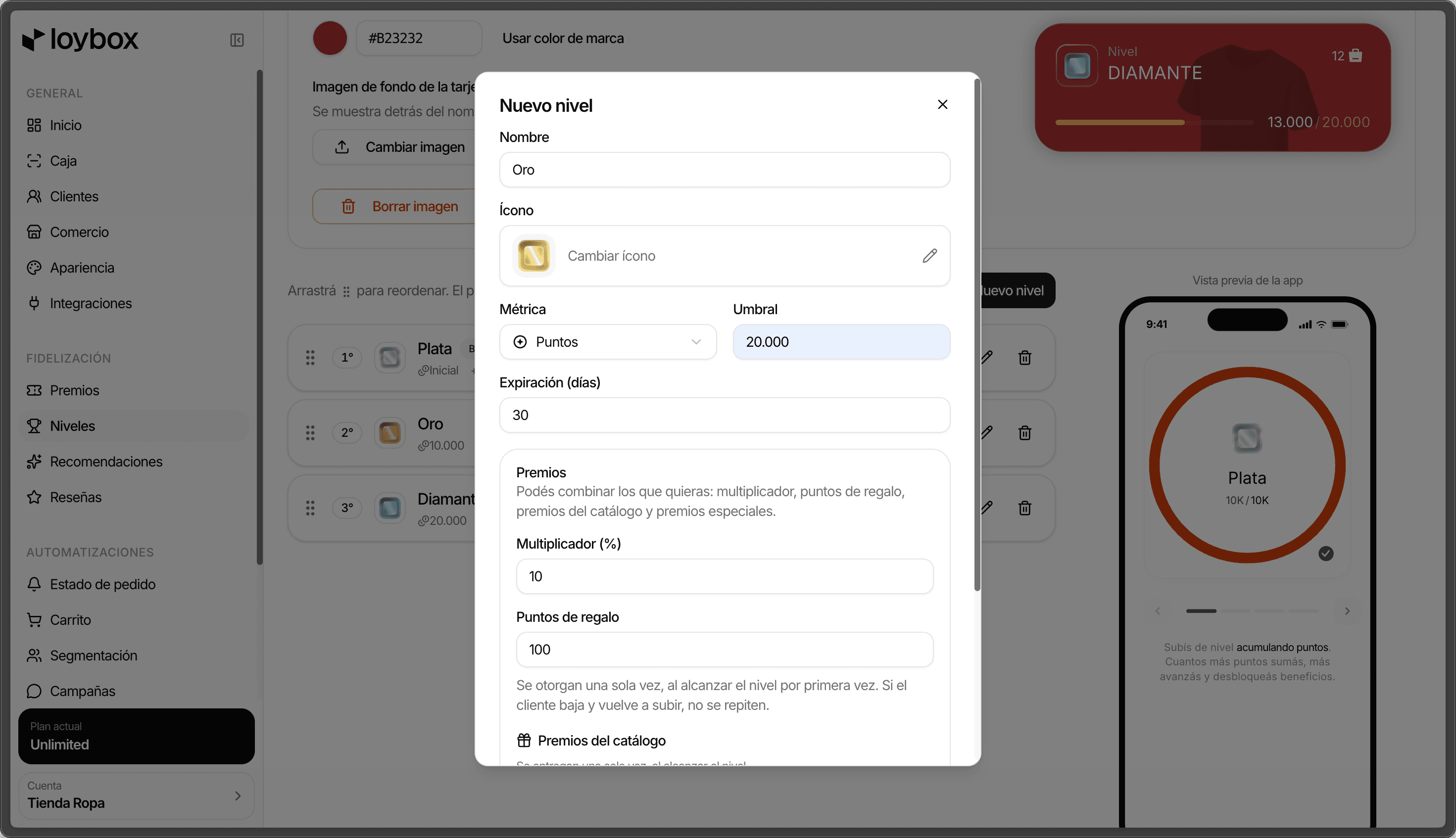
Step by step
Go to Niveles (Tiers)
In the sidebar, under Fidelización (Loyalty), tap Niveles.
Tap Nuevo nivel (New tier)
A window opens to configure the tier. If you do not have any yet, start with the base tier (for example, Bronce, "Bronze"): it is every member's starting point.
Set the Nombre (name)
The name the member sees, for example Oro ("Gold").
Pick an Ícono (icon)
Search for and select an icon for the tier. It is the visual badge shown in the app.
Choose the Métrica (metric)
How progress toward the tier is measured:
- Puntos (points): by accumulated points.
- Monto ($) (amount): by amount spent.
Define the Umbral (threshold)
How much the member needs to accumulate to reach the tier (in points or in money, depending on the metric).
The base tier has no threshold and no expiration: it is the entry step, so these fields do not appear when configuring it.
Adjust the Expiración (días) (expiration in days) (optional)
If you want the tier to be held through activity, enter in how many days it expires. Leave it empty for a tier that never expires.
Load in the tier's Premios (rewards)
You can combine as many as you want:
- Multiplicador (%) (multiplier): the extra percentage of points per purchase (0 = no bonus, 10 = +10%, 100 = double).
- Puntos de regalo (gift points): points awarded once, on reaching the tier for the first time.
- Premios del catálogo (catalog rewards): existing rewards handed over on reaching the tier.
Tap Crear nivel (Create tier)
The tier is saved and appears in your tier ladder.
Ordering the tiers
In the list, drag the tiers to reorder them. The first one is always the base tier, and from there up the thresholds have to go from lower to higher.
Three things worth knowing
The metric is shared by every tier
Points or amount is a choice for the whole ladder, not for a single tier. If you change the metric, it applies to every tier and the thresholds reset to zero: review them before saving.
Exclusive rewards are added afterwards
A tier's exclusive rewards (on arrival, or by event, such as a birthday) are loaded once the tier is saved. Create the tier first, then edit it to add them.
Start simple
You do not need to launch with the full ladder. The base tier plus two or three above it is enough to get going; you can always add more and reorder.